AI SNAPSHOT DISCOVERY / AI VISIBILITY REPORT EXAMPLE

Inside an AI visibility
Discovery report.

See what SERPAION AI Snapshot delivers in a real, on-demand Discovery study. Explore authentic report excerpts covering brand presence, competing alternatives, answer-space risks, visibility indicators and prioritized actions. Built for businesses and agencies; available online and as a client-ready PDF.
AUTHENTIC REPORT EXCERPTS / 1 ENGINE = 1 REPORT UNIT / WEB + PDF
SERPAION Discovery report showing competitive evidence details
Authentic AI Snapshot Discovery report excerpt · Example DeepSeek study · Findings depend on study settings.
INSIDE THE DISCOVERY REPORT / VISIBILITY OVERVIEW

What an AI Visibility & GEO Report Reveals.

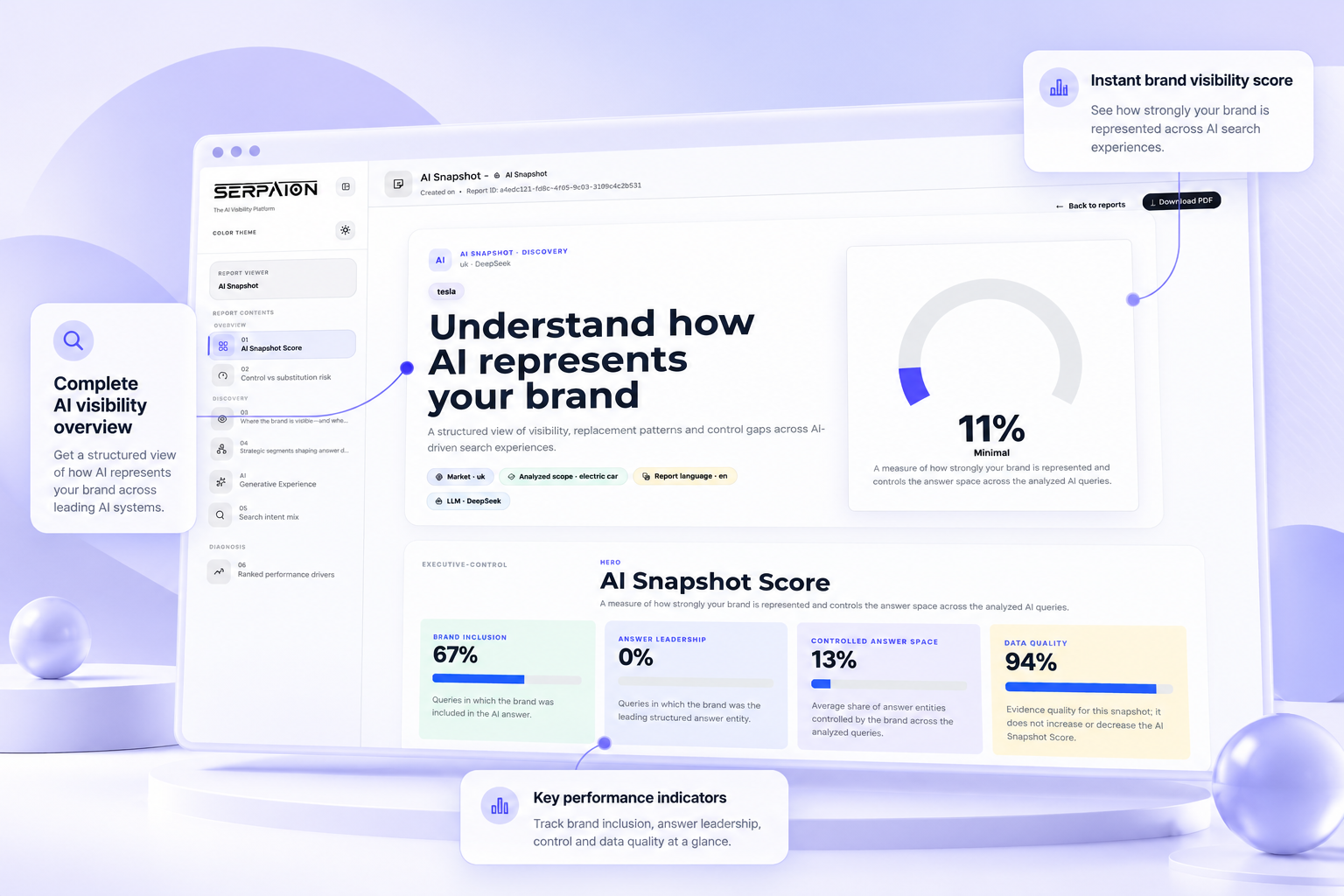
Each SERPAION AI Snapshot Discovery report examines how one selected AI engine represents a brand within a defined topic and market. Its opening overview puts the AI Snapshot Score alongside observed visibility indicators, including brand inclusion, answer leadership and controlled answer space.
A separate data-quality measure provides evidence context. The findings belong to the analyzed study; they are not universal AI rankings or guaranteed future mentions.
SERPAION AI Snapshot Discovery report visibility overview with AI Snapshot Score and brand inclusion indicators
Actual SERPAION report interface · Example study: UK market, DeepSeek. The displayed scores describe this study only; results vary by brand, topic, market and AI engine.
01

The score, in context

Start with the AI Snapshot Score, then review the accompanying visibility measures—not an unexplained global ranking.
02

The signals behind the story

Inspect brand inclusion, answer leadership and answer-space indicators, with data quality presented separately.
03

Reporting you can use

Review the structured findings online or export a client-ready PDF for business teams and agency clients.
ONE SELECTED ENGINE = ONE DISCOVERY REPORT = ONE REPORT UNIT
AI DISCOVERY REPORT / CONTROL & SUBSTITUTION RISK

See brand control and substitution risk in AI answers.

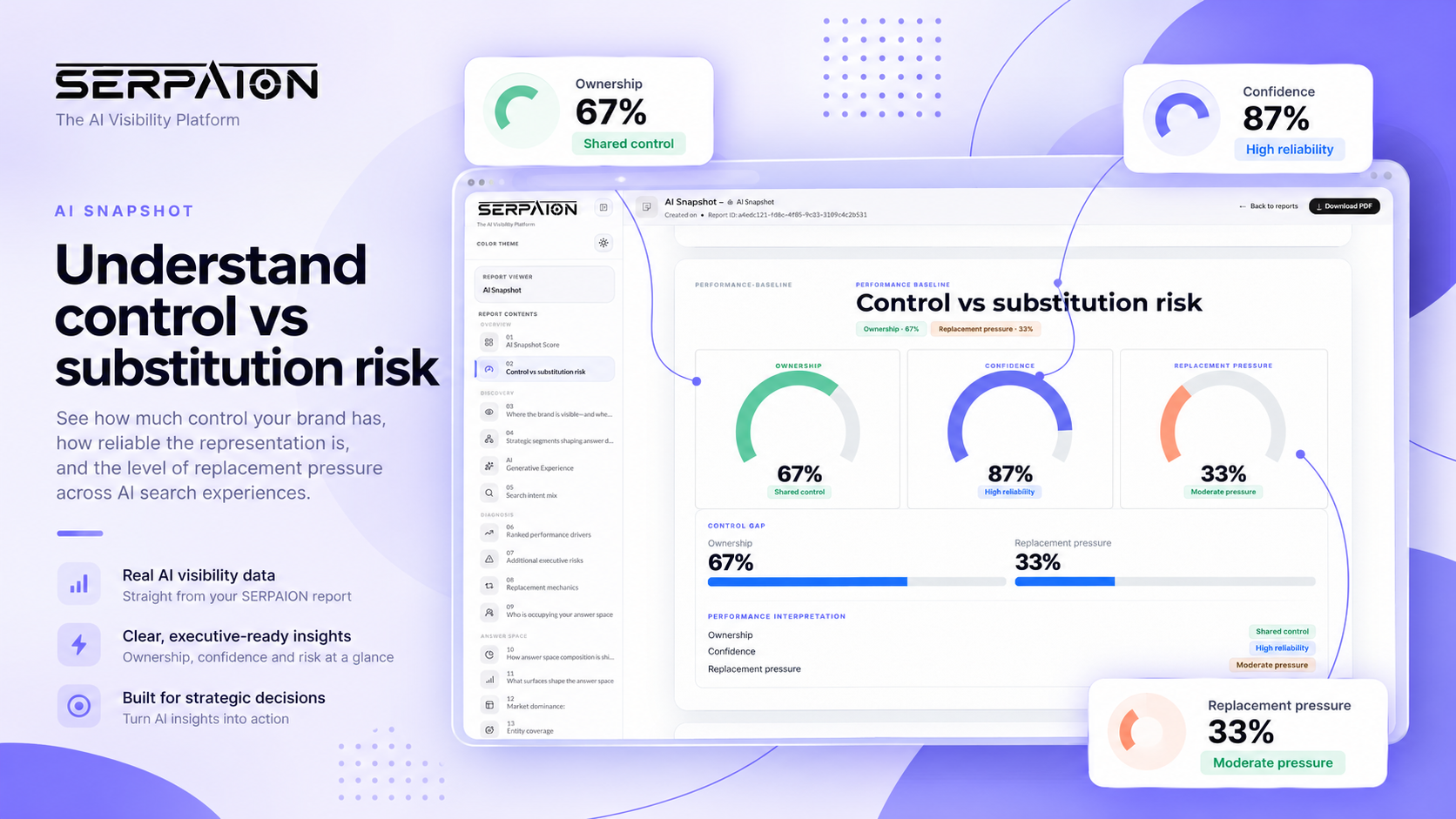
A SERPAION AI Snapshot Discovery report goes beyond counting brand mentions. Its Control vs substitution risk view brings Ownership, Confidence and Replacement Pressure together for the selected AI engine, topic and market.
Review where your brand has a stronger foothold in analyzed AI answers and where competing alternatives may warrant closer investigation. These findings describe a specific study—not automatic, continuous monitoring.
AI Snapshot Discovery report showing ownership, confidence and replacement pressure indicators
Authentic SERPAION AI Snapshot Discovery report example. The 67% Ownership, 87% Confidence and 33% Replacement Pressure shown above apply only to the illustrated study; results vary by brand, engine, market and topic.
01

Ownership: brand control

Understand the degree of brand control observed in the analyzed AI answer space, including shared-control situations.
02

Confidence: reliability signal

Read the report’s confidence indicator in the context of this analysis, not as a guarantee of future AI recommendations.
03

Replacement pressure: alternatives

Assess pressure from competing alternatives within the study and identify the questions worth examining next.
ON-DEMAND DISCOVERY / STUDY-SPECIFIC INDICATORS / ONE REPORT PER SELECTED ENGINE
INSIDE THE DISCOVERY REPORT / 04
GENERATIVE EXPERIENCE
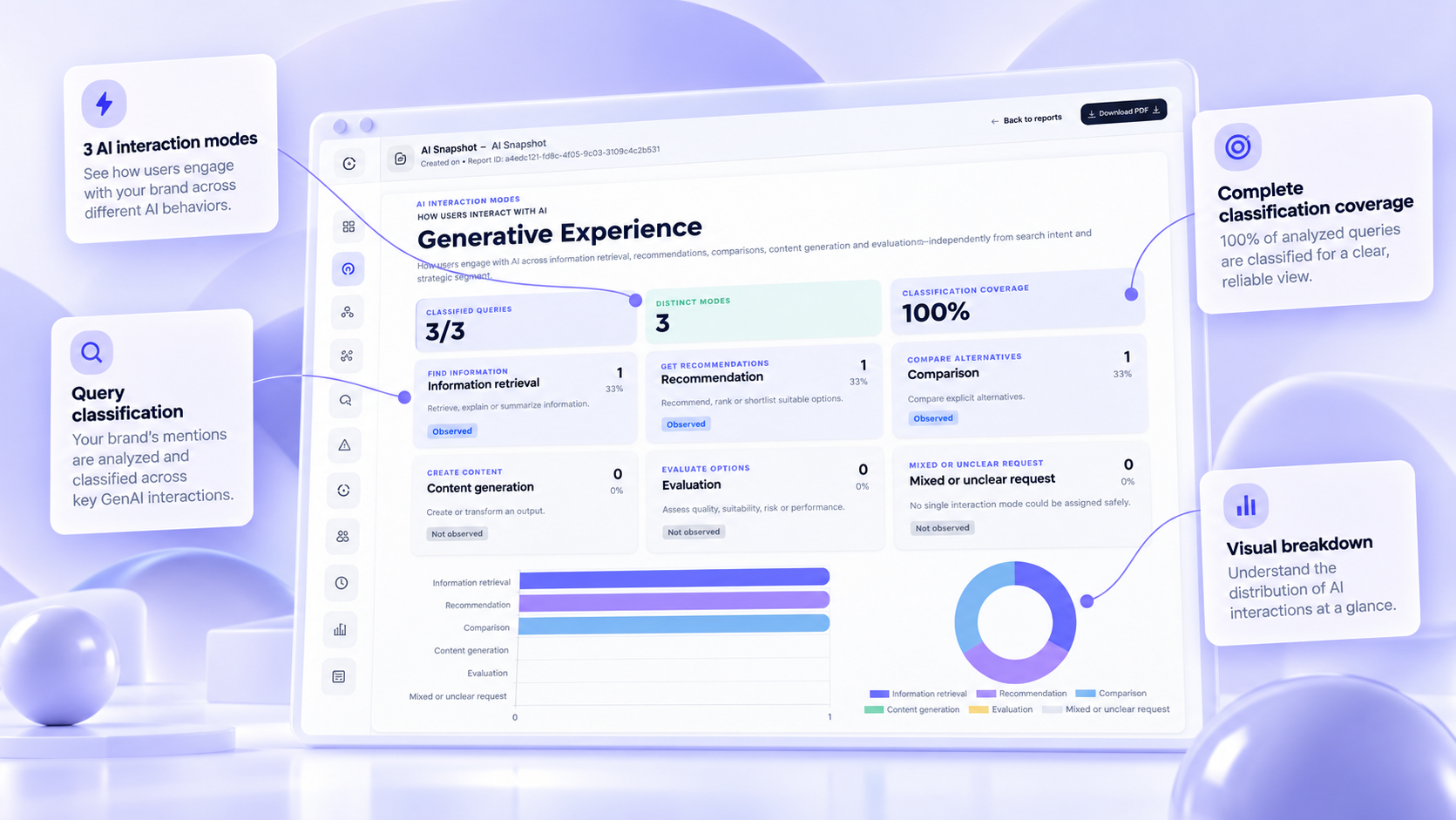
AI Snapshot Discovery Generative Experience view showing types of AI interactions
Actual SERPAION AI Snapshot report example. Figures reflect only the analyzed queries in this study.
ANALYZE INTERACTION MODES

Understand how AI interactions shape brand visibility.

The Generative Experience view in a SERPAION AI Snapshot Discovery report shows which interaction types are represented in the analyzed AI queries.
In the example shown, the observed modes are information retrieval, recommendations and comparisons. This context helps businesses and agencies interpret AI visibility findings more precisely.

Observed in this example

01
Information retrieval
02
Recommendations
03
Comparisons
TRY AI SNAPSHOT
EXAMPLE STUDY: 3/3 QUERIES CLASSIFIED · 3 MODES OBSERVED
100% classification coverage in this sample; not a measure of all AI activity.
DISCOVERY REPORT / COMPETITIVE LANDSCAPE

See who occupies the AI answer space.

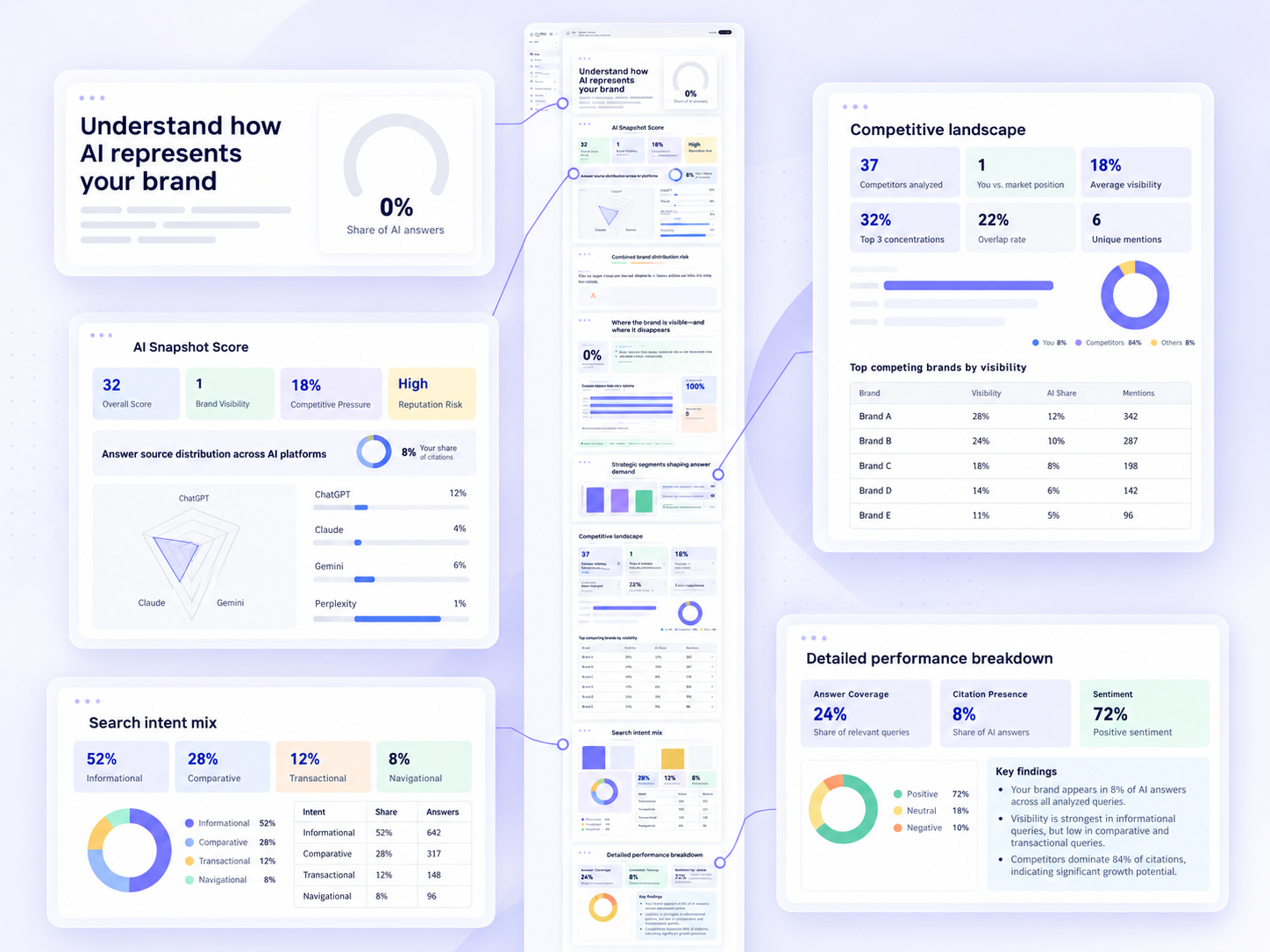
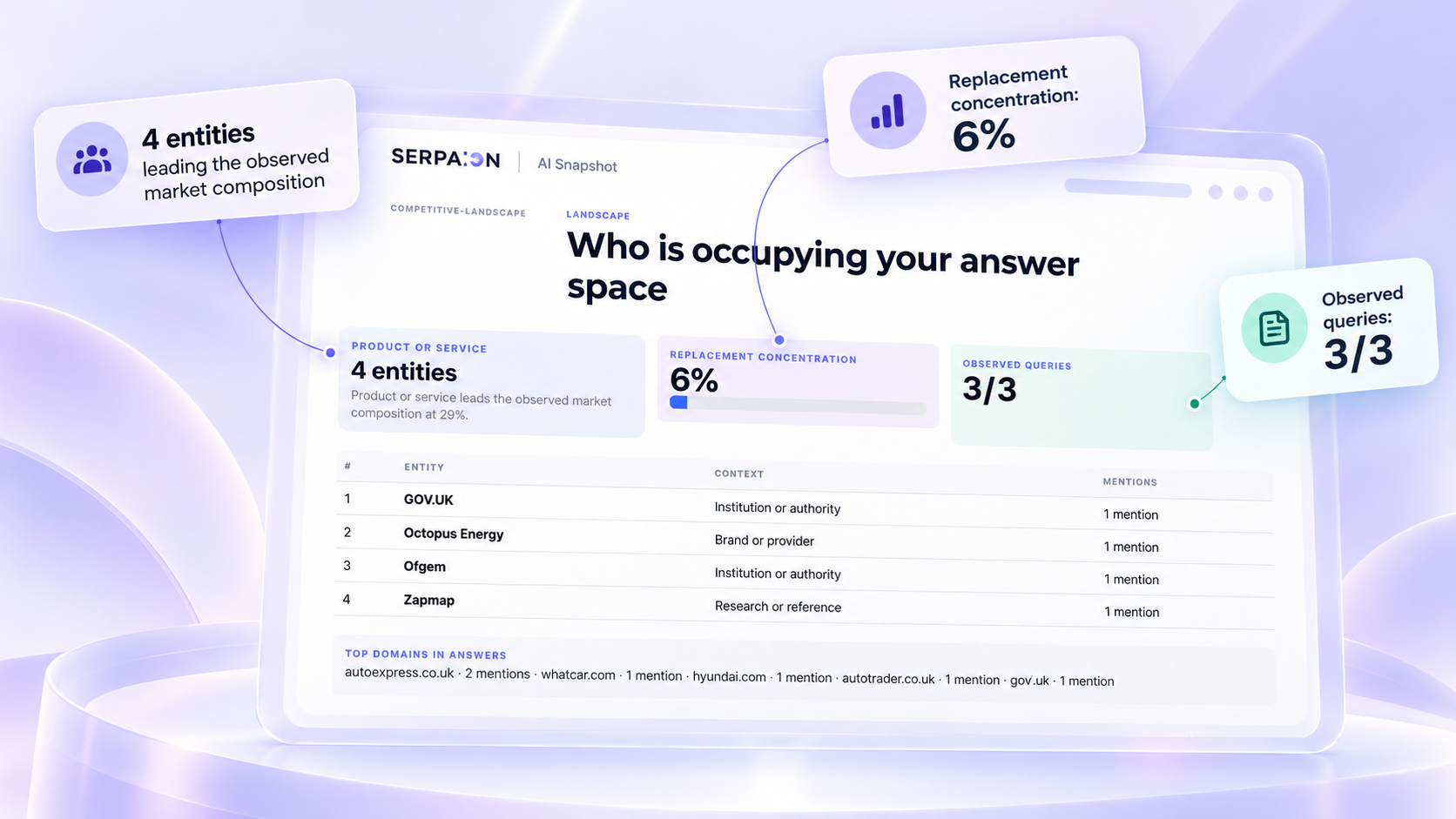
AI Snapshot Discovery shows which brands, providers, authorities and reference sources appear in the AI answers analyzed for a chosen topic and market. See the surrounding competitive landscape—not just your own brand mentions.
AI Snapshot Discovery competitive landscape showing entities appearing in AI answers
Actual SERPAION report illustration. Entities and percentages are specific to the example study; named organizations may be authorities or reference sources, not necessarily direct competitors.
4
ENTITIES SHOWN
Organizations and references appearing in the example
6%
REPLACEMENT CONCENTRATION
Indicator reported for this single Discovery study
3/3
OBSERVED QUERIES
Queries represented in the report excerpt
Use answer-space evidence to inform competitor research and reporting for your own business or client brands. Run a separate on-demand Discovery report for each selected AI engine.
EXPLORE AI SNAPSHOT
HOW TO USE MULTIPLE AI SNAPSHOT REPORTS

Turn one theme into multiple strategic Discovery studies.

AI Snapshot Discovery helps teams investigate one brand or market from different angles. Choose a topic, market and AI engine, then let SERPAION build a structured report. Run a new snapshot for a different theme when you want another strategic perspective—not just a repeated dashboard view.
SERPAION AI Snapshot Discovery request builder dashboard for planning focused studies
A SIMPLE WORKFLOW FOR TEAMS AND CONSULTANTS

Choose the angle. Let SERPAION investigate. Understand what to explore next.

The same brand can raise very different strategic questions. Instead of trying to capture everything in one run, create separate Discovery studies for separate themes. That keeps each report focused, readable and commercially useful.
01

Choose what to explore

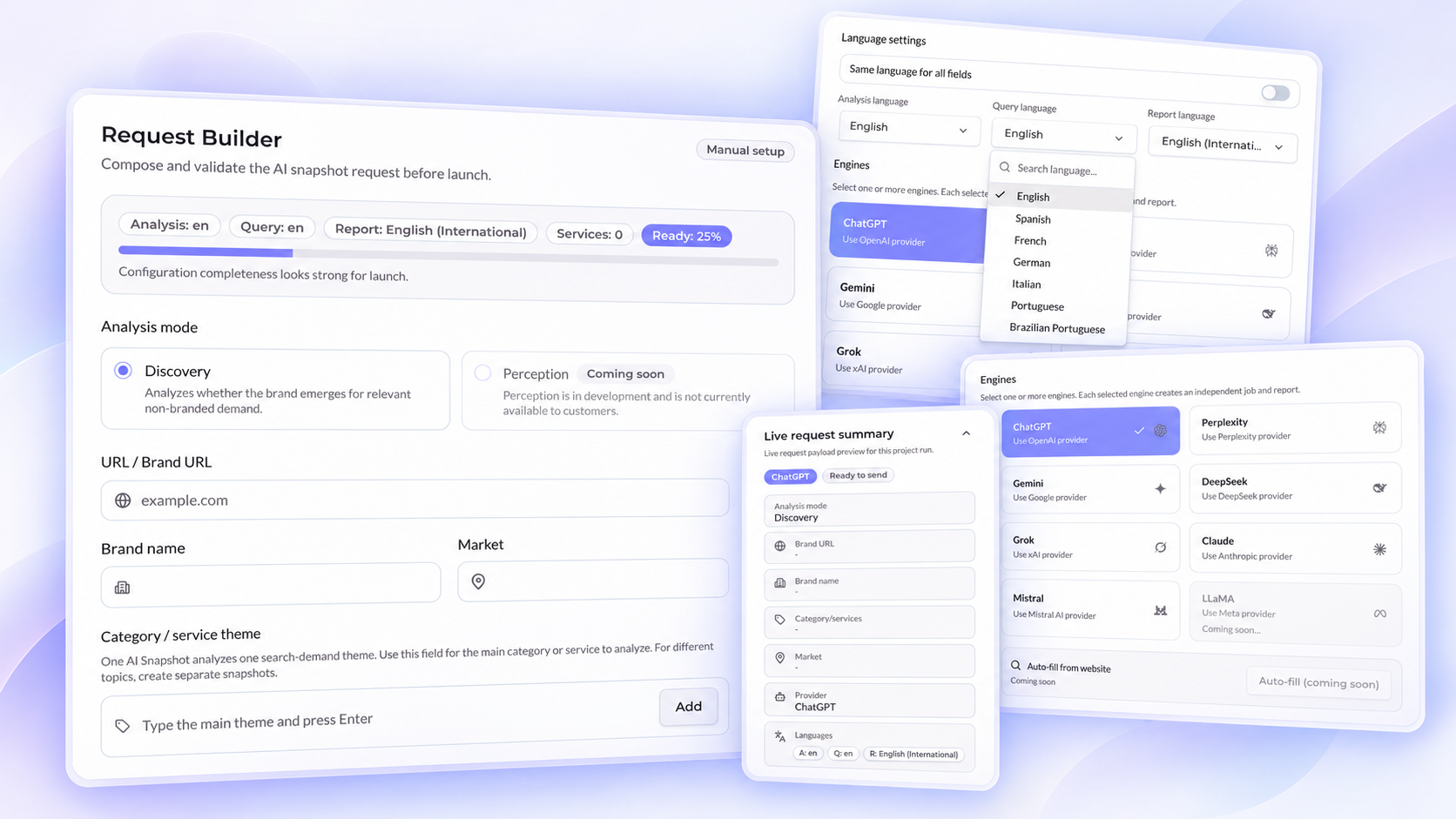
Define the brand, market, main theme and AI engine. You can keep the same language across fields or select different languages for analysis, queries and the final report.
02

Launch a focused Discovery request

One AI Snapshot analyzes one search-demand theme. For different topics, create separate snapshots. Each selected engine creates an independent job and report.
03

Review the structured report

Assess visibility, substitutions, drivers, evidence quality, competitive context and action priorities in a polished report you can present.
04

Explore the next question

Run another report for a different strategic angle: another topic, a different market, or a different provider.
REQUEST BUILDER HIGHLIGHTS

Flexible inputs. Focused reports.

SERPAION already gives teams several strengths that support repeatable Discovery work across markets and providers.
Analysis: en
Query: en
Report: English (International)
7 languages
Ready for launch

7 report languages

Run reports in English, Spanish, French, German, Italian, Portuguese and Brazilian Portuguese.

Independent language controls

Choose different languages for the analysis, generated queries and final report.

Multi-engine choice

ChatGPT, Perplexity, Gemini, DeepSeek, Grok, Claude and Mistral are presented as selectable providers.

Independent jobs per engine

Each selected engine creates an independent job and report.

Live request summary

Review your selected study settings before launching.

One theme per snapshot

Use a new snapshot for a different category or service theme.
WHY THIS WORKFLOW MAKES SENSE

Different topics create different strategic conversations.

This is where SERPAION becomes useful to consultants, agencies and in-house teams. One snapshot may reveal part of the picture. Another topic can surface a different customer need, a different competitive substitution pattern or a different visibility gap worth investigating.
• Use one report to understand the category-level landscape.
• Use a second report to inspect a concrete customer concern.
• Use a third report to evaluate another purchase context or market angle.
• Use the final reports to support strategic conversations, not just dashboard review.
ANOTHER MODE / COMING SOON

Perception

Coming soon
Perception is a separate analysis mode. Instead of asking whether a brand emerges for non-branded demand, it explores how an AI model describes, evaluates and qualifies a brand when the brand is explicitly named.
Perception is a separate, optional analysis mode coming soon. It is not required for Discovery and is not included in current Discovery reports.
Separate analysis mode
Brand explicitly named
Complementary to Discovery
FROM REPORT TO ACTION / 3-STEP WORKFLOW

Make every AI Discovery study count.

Start with a question that matters to your business. Configure the brand and research topic, select the relevant languages and choose the AI engines to investigate. SERPAION AI Snapshot then examines a focused set of AI queries and produces a separate on-demand Discovery report for each selected engine.
FOCUSED STUDIES. CLEAR RESULTS.
Each report is a snapshot of a defined topic, market, language and AI engine—not a measurement of every possible AI answer.
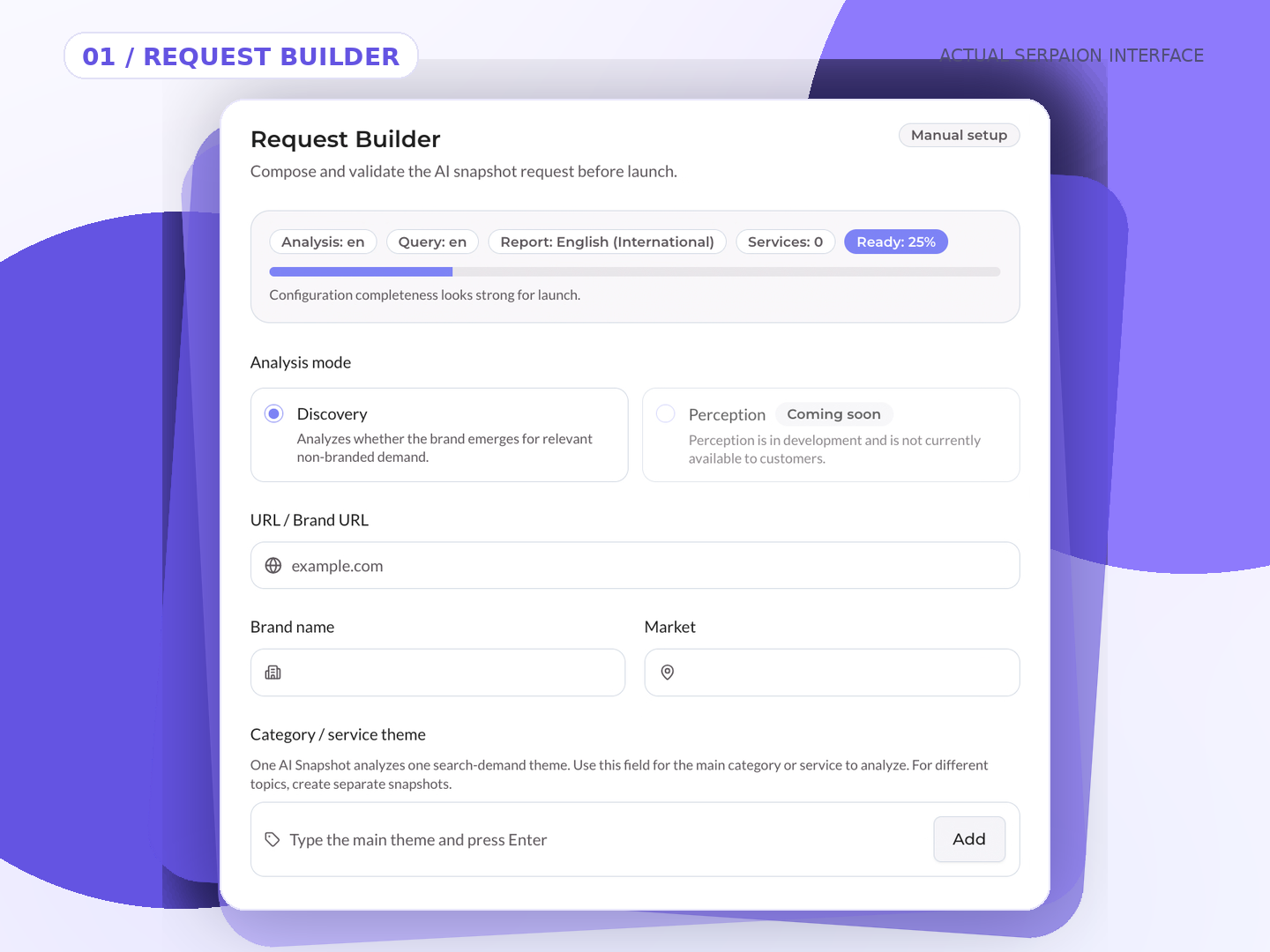
01 / REQUEST BUILDER

Define your brand and research question.

Enter the website and brand, choose the market, then set a category or customer question to investigate. There is no need to supply a manual list of individual prompts.
DISCOVERY / AVAILABLE NOW
SERPAION Discovery request builder for configuring brand, market and research topic
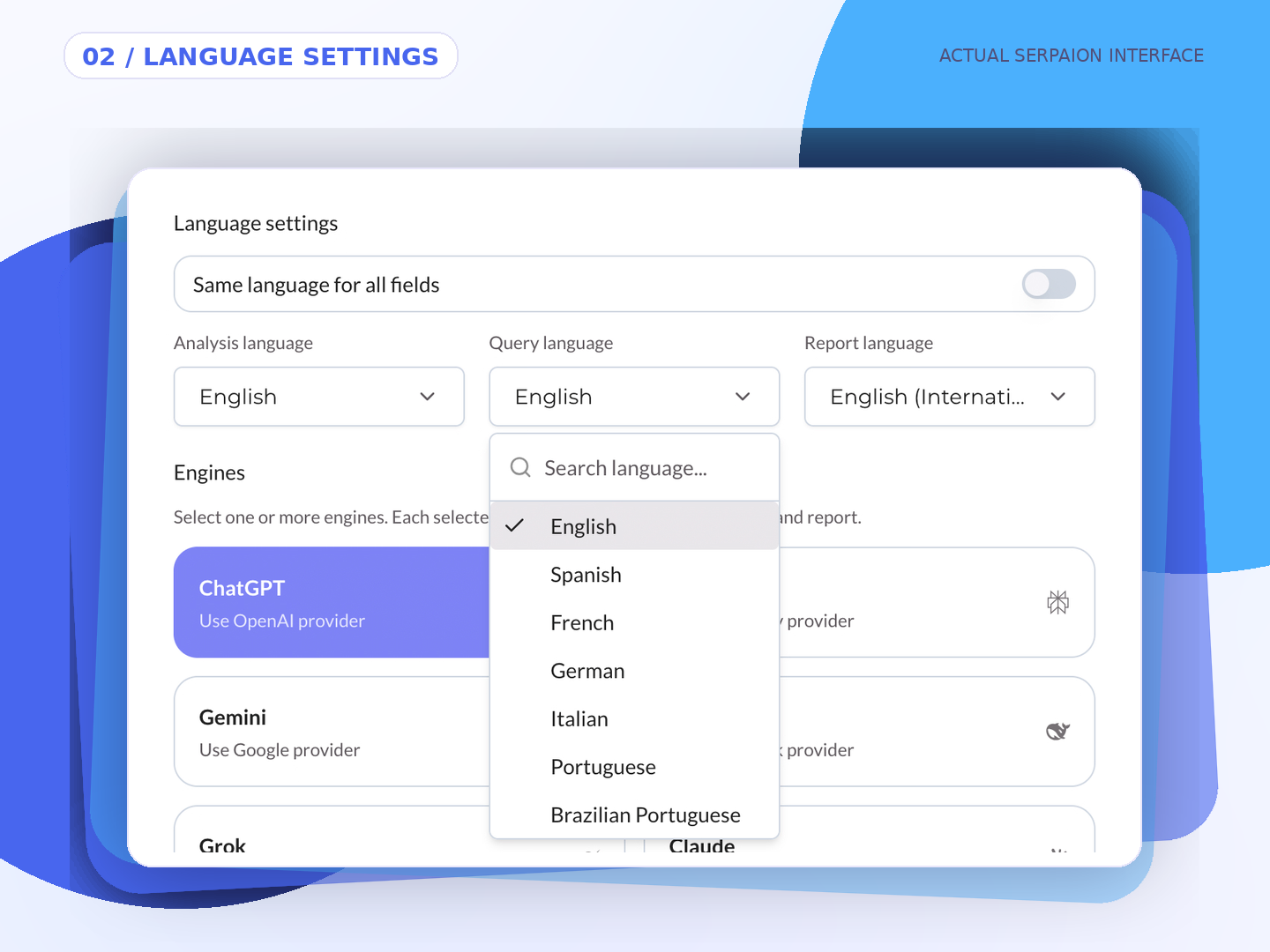
02 / LANGUAGE SETTINGS

Choose the languages that matter.

Set the analysis, query and report languages for the market and audience you want to examine.
SERPAION AI Snapshot language settings for analysis, queries and report
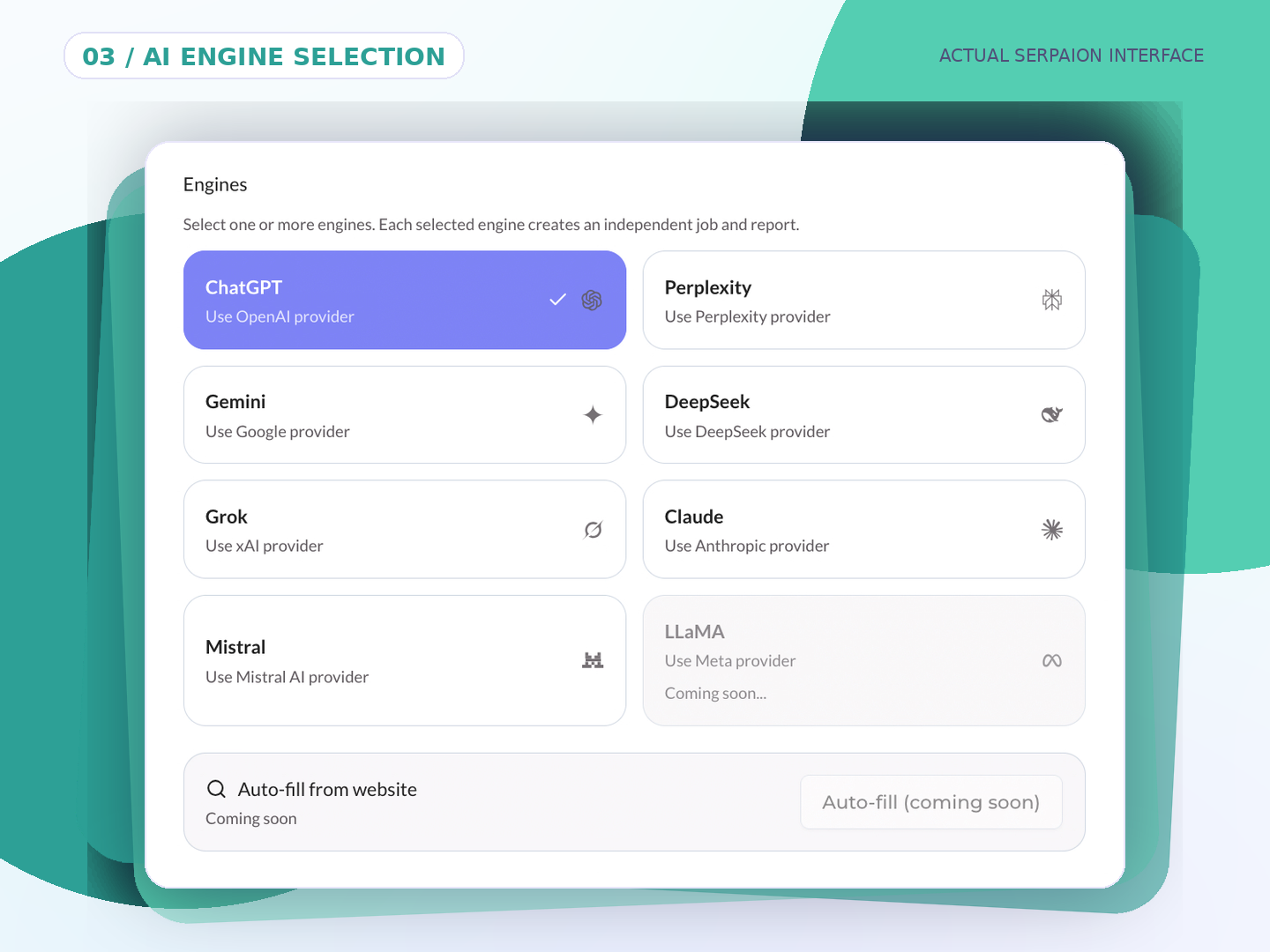
03 / AI ENGINE SELECTION

Choose the AI engines to investigate.

Select from seven available AI engines. Every selected engine generates an independent Discovery report and uses one Report Unit.
SERPAION AI Snapshot engine selection interface for Discovery studies
ACTUAL SERPAION SOFTWARE SCREENSHOTS
Discovery is available now. Perception, LLaMA and website autofill are Coming Soon; they are not included in current Discovery reports.
GET MORE FROM AI SNAPSHOT

How to get more from every Discovery report.

One brand. Different questions. More perspectives.Investigate the same brand across different search topics and buying scenarios. Each study gives you a new analytical context—not a repeat of the same test.
THE IDEA

Change the question. Change the insight.

One broad category, one buyer concern, one purchase scenario.
1
BRAND
3
STUDIES
3
REPORTS*
*With one AI engine selected per study.
Example: one electric-vehicle brand, three research topics. Investigate the market category, then charging costs, then family buying needs. These are illustrative studies—not three identical runs.
DISCOVERY STUDY
01

Electric cars

Start with the market. Explore the broader competitive landscape of the brand’s main category.
What it explores
Category-level AI visibility, substitutes and competitive context.
Why run this study?
Establish a category baseline before investigating more specific questions.
MARKET LANDSCAPE
DISCOVERY STUDY
02

EV charging costs

Investigate buyer concerns. Focus on charging costs and affordability.
What it explores
Ownership costs, pricing narratives and where competing alternatives gain attention.
Why run this study?
Understand how AI answers frame a concrete customer concern.
CUSTOMER CONCERNS
DISCOVERY STUDY
03

Family electric vehicles

Explore buying scenarios. Focus on practical family needs.
What it explores
Family-fit positioning, practical considerations and comparative recommendations.
Why run this study?
See how a different purchase context changes the answer landscape.
PURCHASE CONSIDERATIONS
REPORT UNITS: Each selected AI engine creates one independent report and uses one Report Unit. Three studies with one engine selected per study produce three reports and use three units. Findings are specific to each study.
NEXT / PRACTICAL DISCOVERY FAQS

Ready to plan your first Discovery study?

The FAQs below explain how SERPAION selects relevant queries, why every report is a focused snapshot, when to run another study and how Report Units work.
EXPLORE THE FAQS
AI SNAPSHOT / PRACTICAL DISCOVERY GUIDE

How to Use AI Snapshot Discovery: Practical Questions Answered

Better questions. Smarter AI Discovery.
Practical answers to help you plan AI Snapshot Discovery studies, interpret focused AI visibility reports and explore different buyer questions without confusing a snapshot with the whole market.
ONE BRAND. MORE PERSPECTIVES.

One question is a start.

Run focused Discovery studies to investigate new topics and buying contexts. Every selected AI engine generates a separate report.
1 ENGINE = 1 REPORT = 1 REPORT UNIT
01 / PLAN YOUR DISCOVERY

Build smarter studies

Start with the right question. Then go deeper.

How can I get the most out of SERPAION AI Snapshot?

Use AI Snapshot to investigate focused strategic questions, rather than relying on a single broad analysis. Run separate Discovery studies for different search topics, customer concerns, product categories or buying scenarios. Each selected AI engine produces its own report, providing a context-specific view of brand presence and competing alternatives.

What should my first AI Discovery study focus on?

Start with your main product category, service or market topic. This gives you an initial view of brand mentions, omissions and competitors appearing in relevant AI-generated answers. Use what you learn to choose more specific topics for subsequent studies.

Why run multiple Discovery studies for the same brand?

Different buyer questions can lead to different AI answers. A broad category study may reveal one set of alternatives, while a study about pricing, use cases or purchasing needs may surface others. Multiple focused studies help you investigate those contexts separately; they are not repeated copies of the same test.

Should I change the search topic or select another AI engine?

Change the search topic when you want to investigate a different customer question or buying context. Select another AI engine when you want a separate Discovery report for the configured study from that provider. Each selected engine uses one Report Unit and generates its own report.

Do I need to write individual AI prompts to run a Discovery study?

No. Configure the brand, website, search topic, market, language settings and AI engine in AI Snapshot. You do not need to supply a manual list of individual prompts to start a Discovery study.

How does SERPAION select queries for a Discovery study?

AI Snapshot uses the configured brand and research context—including topic, market and language—to identify relevant AI queries for the study. The report examines a focused selection of questions, not every possible query. The internal selection method is proprietary; the resulting findings are presented in a structured report.
02 / UNDERSTAND THE SNAPSHOT

Read the findings in context

One report is a focused view, not the entire AI landscape.

Does one Discovery report show everything AI says about my brand?

No. An AI Snapshot Discovery report captures a defined set of relevant AI answers for a chosen topic, market, language and AI engine. Its visibility indicators and findings apply to that analyzed context, not to every AI system, question or buying journey.

Why is it called an AI Snapshot?

Because each study captures one focused view of a much larger and changing AI search landscape. SERPAION organizes the investigation into separate, interpretable reports so you can examine particular strategic questions instead of mistaking a single score for universal brand visibility.

How can I build a broader understanding of AI brand visibility?

Begin with your core category, then run additional Discovery studies around specific concerns, use cases, markets, languages or AI engines. Compare what each report reveals within its own context. More snapshots can offer complementary perspectives, but they do not guarantee exhaustive coverage of AI search.

How should I use findings from multiple Discovery reports?

Review each report alongside its study settings and examine brand mentions, omissions, competing alternatives, visibility indicators and recommended actions. Use the findings to inform competitive research, content priorities and future studies. Treat recommendations as inputs for evaluation, not guaranteed visibility improvements.
03 / REPORTS & AVAILABILITY

Know what you receive

Clear report usage and product availability.

How many Report Units do multiple Discovery studies use?

Each selected AI engine generates one independent Discovery report and consumes one Report Unit. For example, three studies with one engine each generate three reports and use three units. Three studies with two engines each generate six independent reports and use six units.

Can businesses and agencies use the same Discovery strategy?

Yes. Businesses can explore their own brand across categories, products and customer needs. Agencies and consultants can apply the same workflow to individual client brands and use the web and client-ready PDF reports to support research and presentations. Specialist-reviewed reports and white-label services are separately commissioned offerings.

What is the difference between AI Snapshot Discovery and Perception?

Discovery and Perception are separate analysis modes within SERPAION AI Snapshot, not report metrics. Discovery is available now and investigates brand presence, omissions and competing alternatives in AI answers. Perception is Coming Soon and is being developed to examine how AI describes, categorizes and positions a brand when explicitly named. Perception is not included in current Discovery reports.

Ready to explore your brand in AI answers?

Start a focused Discovery study with SERPAION AI Snapshot.
TRY AI SNAPSHOT